you are on the new server domainname will switch later
If you can not login please clear cookies
chevron_left
chevron_right
DPRevived & The Photo
  • Home
  • Forums
    • theatersAll Forums arrow_forward
      • chat_bubbleNews and Discussions arrow_forward
        • camera The Basics- for Beginners and others
        • camera Buying advice
        • camera The History of Photography
        • camera Image discussions, critiques and challenges
        • camera Photography News & Rumours
        • camera Open Talk
        • camera Resources discussions
        • camera Technical Discussions
      • chat_bubblePhotographic Equipment arrow_forward
        • camera Accessories, lighting & studio
        • camera Adapted and 3rd party lenses
        • camera Canon
        • camera Compact/Bridge
        • camera Fujifilm
        • camera Leica
        • camera Micro Four Thirds Talk
        • camera Medium/Large Format cameras
        • camera Mobile Phones
        • camera Nikon
        • camera Olympus/OM Systems
        • camera Other Manufacturers
        • camera Panasonic
        • camera Pentax/Ricoh
        • camera Sigma
        • camera Sony
      • chat_bubblePhotographic Genres arrow_forward
        • camera Abstract, Minimalism & Creative
        • camera Photo Art
        • camera Documentary and Street
        • camera Events Photography
        • camera Home Photography
        • camera Macro and Still Life Photography
        • camera Nature and Wildlife Photography
        • camera Portrait and People Photography
        • camera Landscape and Travel Photography
        • camera Sport and Action Photography
        • camera Transportation
        • camera Architecture
        • camera Underwater Photography
      • chat_bubbleSite Discussions arrow_forward
        • camera Development
        • camera Requests, help and bugs found
        • camera Governance and organisation
        • camera How to do things on this site
        • camera Useful Browser Plugins
        • camera Forum updates
      • chat_bubblePhotographic Techniques arrow_forward
        • camera 3D and Stereo Photography
        • camera Astrophotography & low light
        • camera B&W and Monochrome Photography
        • camera DIY and Photo Experiments
        • camera Drone Photography Talk Forum
        • camera Film based techniques
        • camera General Techniques and ideas
        • camera Infra Red/UV Photography
        • camera Digital Darkroom - tools & methods
  • Threads
  • Users
  • Web Site
  • message
  • group
  • chevron_right Threads
  • label All Forums
  • label techniques Photographic Techniques
  • label General General Techniques and ideas

Colour and luminance as components of an image

tiresias
Aug. 20, 2023
chat_bubble_outline 15
arrow_downward
  • link
    tiresias
    Members 2 posts
    Aug. 20, 2023, 2:38 p.m. Aug. 20, 2023, 2:38 p.m.
    link

    I'm trying to replicate the colour-only images that Tom Axford posted last year on dpreview in this thread:

    www.dpreview.com/forums/post/66129684

    using Affinity Photo, but not having much success. I have tried converting the colour image to LAB, then making only the L channel editable and visible, then filling the whole area with solid mid grey (RGB 128, 128, 128). When I switch the a and b channels to visible I see something a bit like Tom's results but the image is less distinct and much less vibrant.

    Does anyone know how to do this properly?

    BTW: I tried posting a reply to the thread at dpreview, but for some reason it is not showing up - perhaps the thread was considered too old.

  • link
    simplejoy
    Members 1598 posts
    Aug. 20, 2023, 2:54 p.m. Aug. 20, 2023, 2:54 p.m.
    link

    You can take a look at the last two pages of this thread:
    dprevived.com/t/what-are-your-biggest-inspirationsmotivation-boosts/4292/

    @TomAxford was nice enough to explain some of the techniques there once again, because I wasn‘t able to replicate some aspects. Perhaps your question is answered there as well!

    tiresias likes this.

    favorite 1

  • link
    tiresias
    Members 2 posts
    Aug. 20, 2023, 3:31 p.m. Aug. 20, 2023, 3:31 p.m.
    link

    Thanks. It seems very easy in Affinity. Add an HSL adjustment layer, and in its properties box tick HSV (top left) and drag the Luminosity slider to 100%. :)

  • link
    TomAxford
    Members 394 posts
    Aug. 20, 2023, 4:52 p.m. Aug. 20, 2023, 4:52 p.m.
    link
    @tiresias has written:

    Thanks. It seems very easy in Affinity. Add an HSL adjustment layer, and in its properties box tick HSV (top left) and drag the Luminosity slider to 100%. :)

    Yes, that sounds right. In HSV, the V channel is defined as V = max(R, G, B), so making V = 100% means that at least one of R, G and B is 100%, which is the maximum luminosity possible for that colour without clipping one of the colour channels.

    The problem with using HSL or LAB is that raising luminosity to 100% can lead to clipping of one or more colour channels, which inadvertently reduces the colour saturation and possibly changes the hue also.

    simplejoy likes this.

    favorite 1

  • link
    JimKasson
    Members 1737 posts
    Aug. 20, 2023, 6:06 p.m. Aug. 20, 2023, 6:06 p.m.
    link
    @tiresias has written:

    I'm trying to replicate the colour-only images that Tom Axford posted last year on dpreview in this thread:

    www.dpreview.com/forums/post/66129684

    using Affinity Photo, but not having much success. I have tried converting the colour image to LAB, then making only the L channel editable and visible, then filling the whole area with solid mid grey (RGB 128, 128, 128). When I switch the a and b channels to visible I see something a bit like Tom's results but the image is less distinct and much less vibrant.

    Does anyone know how to do this properly?

    BTW: I tried posting a reply to the thread at dpreview, but for some reason it is not showing up - perhaps the thread was considered too old.

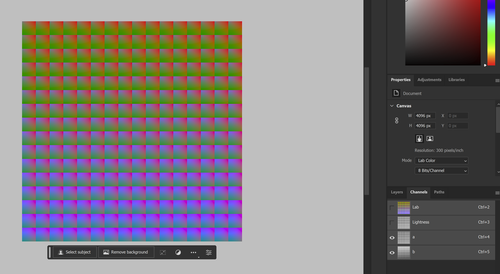
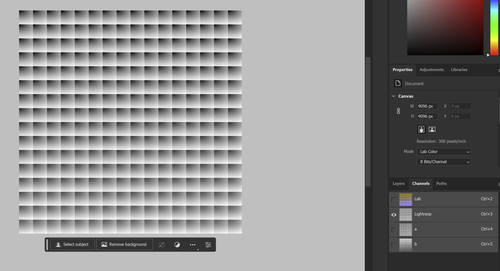
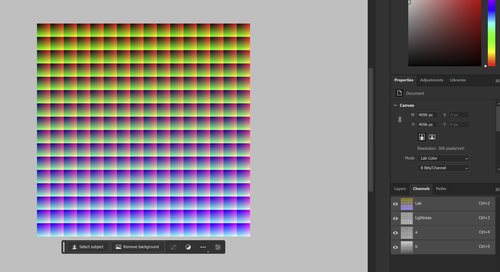
    I don't use Affinity Photo, but in Ps, you just convert to Lab and turn the layers on and off.

    Screenshot 2023-08-20 110402.png
    Screenshot 2023-08-20 110304.png
    Screenshot 2023-08-20 110325.png

    Screenshot 2023-08-20 110402.png

    PNG, 2.0 MB, uploaded by JimKasson on Aug. 20, 2023.

    Screenshot 2023-08-20 110304.png

    PNG, 890.3 KB, uploaded by JimKasson on Aug. 20, 2023.

    Screenshot 2023-08-20 110325.png

    PNG, 2.3 MB, uploaded by JimKasson on Aug. 20, 2023.

    simplejoy likes this.

    favorite 1

  • link
    xpatUSA
    Members 1151 posts
    Aug. 20, 2023, 7:34 p.m. Aug. 20, 2023, 7:34 p.m.
    link
    @TomAxford has written:
    @tiresias has written:

    Thanks. It seems very easy in Affinity. Add an HSL adjustment layer, and in its properties box tick HSV (top left) and drag the Luminosity slider to 100%. :)

    Yes, that sounds right. In HSV, the V channel is defined as V = max(R, G, B), so making V = 100% means that at least one of R, G and B is 100%, which is the maximum luminosity possible for that colour without clipping one of the colour channels.

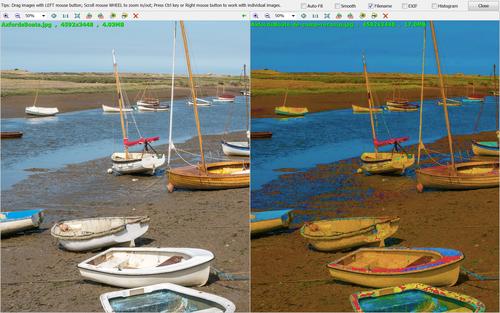
    The GIMP has 'decompose' and 'recompose' options and any space can be selected. Here's a trip to HSV and back with S set to 50% and V turned down a bit in Curves:

    AxfordsBoats-de-comp-recomp.jpg
    Adjusting the Saturation and Value affected the whites big-time!

    AxfordsBoats-de-comp-recomp.jpg

    JPG, 2.0 MB, uploaded by xpatUSA on Aug. 20, 2023.

  • link
    xpatUSA
    Members 1151 posts
    Aug. 20, 2023, 7:49 p.m. Aug. 20, 2023, 7:49 p.m.
    link
    @tiresias has written:

    I'm trying to replicate the colour-only images that Tom Axford posted last year on dpreview in this thread:

    www.dpreview.com/forums/post/66129684

    Does anyone know how to do this properly?

    If your only interest is in the hues, there's an app called Show Image which will show all them all in living color at 100% saturation:

    kronometric.org/phot/color/ShowImage.exe

    Still runs on my Win 7 computer, don't know about later - or Mac for that matter.

  • link
    TomAxford
    Members 394 posts
    Aug. 20, 2023, 8:25 p.m. Aug. 20, 2023, 8:25 p.m.
    link
    @xpatUSA has written:

    Adjusting the Saturation and Value affected the whites big-time!

    Yes, that is bound to be the case. Pure whites and neutral greys have 0% saturation, so when the saturation is set to 50%, the only way to do that is to turn it into some arbitrary colour. If the colour is just off-white, setting the saturation to 50% exaggerates the colour hugely.

    In JPEG images, most "whites" will actually be very slightly off-white because of JPEG compression errors and these errors will be hugely exaggerated when the saturation is increased to 50%.

    Errors of this sort can be substantially reduced by using 16-bit TIFF images instead of JPEGs.

  • link
    simplejoy
    Members 1598 posts
    Aug. 20, 2023, 8:35 p.m. Aug. 20, 2023, 8:35 p.m.
    link
    @JimKasson has written:

    I don't use Affinity Photo, but in Ps, you just convert to Lab and turn the layers on and off.

    Screenshot 2023-08-20 110402.png
    Screenshot 2023-08-20 110304.png
    Screenshot 2023-08-20 110325.png

    Thanks, that‘s very interesting! Is it possible to reduce the amount of one of those layers/channels (L,a,b) or create a copy of how the image looks when L is deactivated for example?

  • link
    xpatUSA
    Members 1151 posts
    Aug. 20, 2023, 8:43 p.m. Aug. 20, 2023, 8:43 p.m.
    link
    @TomAxford has written:
    @xpatUSA has written:

    Adjusting the Saturation and Value affected the whites big-time!

    Yes, that is bound to be the case. Pure whites and neutral greys have 0% saturation, so when the saturation is set to 50%, the only way to do that is to turn it into some arbitrary colour. If the colour is just off-white, setting the saturation to 50% exaggerates the colour hugely.

    In JPEG images, most "whites" will actually be very slightly off-white because of JPEG compression errors and these errors will be hugely exaggerated when the saturation is increased to 50%.

    Errors of this sort can be substantially reduced by using 16-bit TIFF images instead of JPEGs.

    No doubt.

    Currently, I am using 32-bit floating point Linear in the GIMP. To get a pure Hue Map, I decompose to HSV; fill S and V with some shade of gray; then recompose.

    ... the result is not for the faint-hearted!

  • link
    JimKasson
    Members 1737 posts
    Aug. 21, 2023, 3:53 p.m. Aug. 21, 2023, 3:53 p.m.
    link
    @simplejoy has written:

    Is it possible to reduce the amount of one of those layers/channels (L,a,b) or create a copy of how the image looks when L is deactivated for example?

    Sure. Edit one or more of the channels.

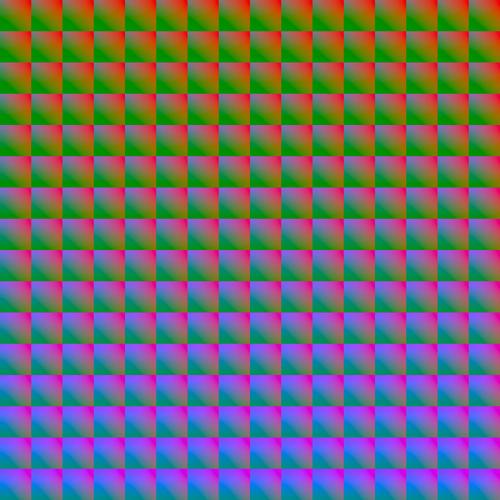
    With L* set to 50:

    RGB16Million.jpg

    RGB16Million.jpg

    JPG, 1.3 MB, uploaded by JimKasson on Aug. 21, 2023.

    simplejoy likes this.

    favorite 1

  • link
    simplejoy
    Members 1598 posts
    Aug. 21, 2023, 5 p.m. Aug. 21, 2023, 5 p.m.
    link
    @JimKasson has written:
    @simplejoy has written:

    Is it possible to reduce the amount of one of those layers/channels (L,a,b) or create a copy of how the image looks when L is deactivated for example?

    Sure. Edit one or more of the channels.

    With L* set to 50:

    RGB16Million.jpg

    Thanks - I've no idea how to do that though... I can't change opacity/visibility of channels.

  • link
    JimKasson
    Members 1737 posts
    Aug. 21, 2023, 5:44 p.m. Aug. 21, 2023, 5:44 p.m.
    link
    @simplejoy has written:
    @JimKasson has written:
    @simplejoy has written:

    Is it possible to reduce the amount of one of those layers/channels (L,a,b) or create a copy of how the image looks when L is deactivated for example?

    Sure. Edit one or more of the channels.

    With L* set to 50:

    RGB16Million.jpg

    Thanks - I've no idea how to do that though... I can't change opacity/visibility of channels.

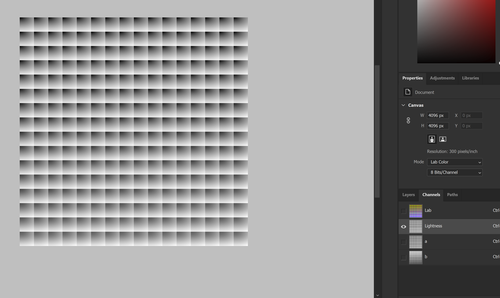
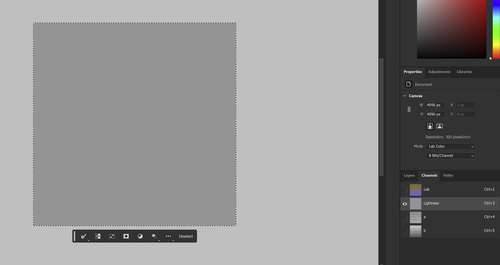
    Select the L* channel.

    Screenshot 2023-08-21 103719.png

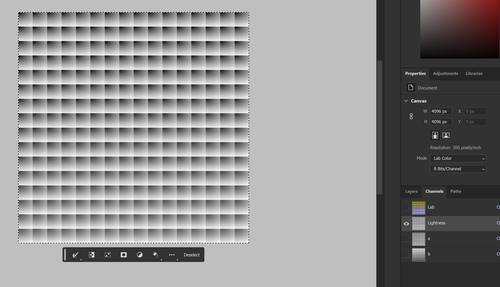
    Select All:

    Screenshot 2023-08-21 103800.png

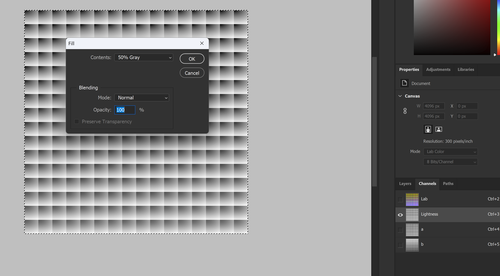
    Fill with 50% gray:

    Screenshot 2023-08-21 103823.png

    Screenshot 2023-08-21 103904.png

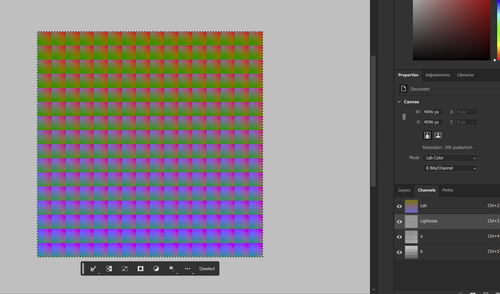
    Turn on all channels:

    Screenshot 2023-08-21 104014.png

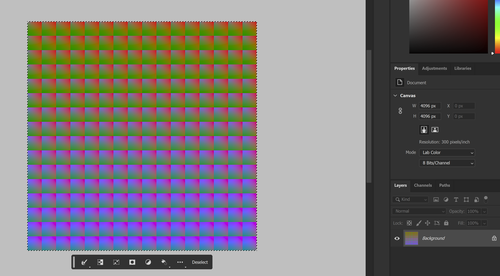
    Go to layers to check your work:

    Screenshot 2023-08-21 104051.png

    Screenshot 2023-08-21 104051.png

    PNG, 2.0 MB, uploaded by JimKasson on Aug. 21, 2023.

    Screenshot 2023-08-21 104014.png

    PNG, 2.0 MB, uploaded by JimKasson on Aug. 21, 2023.

    Screenshot 2023-08-21 103904.png

    PNG, 162.5 KB, uploaded by JimKasson on Aug. 21, 2023.

    Screenshot 2023-08-21 103823.png

    PNG, 732.7 KB, uploaded by JimKasson on Aug. 21, 2023.

    Screenshot 2023-08-21 103800.png

    PNG, 887.1 KB, uploaded by JimKasson on Aug. 21, 2023.

    Screenshot 2023-08-21 103719.png

    PNG, 878.9 KB, uploaded by JimKasson on Aug. 21, 2023.

    simplejoy likes this.

    favorite 1

  • link
    simplejoy
    Members 1598 posts
    Aug. 21, 2023, 5:47 p.m. Aug. 21, 2023, 5:47 p.m.
    link
    @JimKasson has written:
    @simplejoy has written:
    @JimKasson has written:
    @simplejoy has written:

    Is it possible to reduce the amount of one of those layers/channels (L,a,b) or create a copy of how the image looks when L is deactivated for example?

    Sure. Edit one or more of the channels.

    With L* set to 50:

    RGB16Million.jpg

    Thanks - I've no idea how to do that though... I can't change opacity/visibility of channels.

    Select the L* channel.

    Screenshot 2023-08-21 103719.png

    Select All:

    Screenshot 2023-08-21 103800.png

    Fill with 50% gray:

    Screenshot 2023-08-21 103823.png

    Screenshot 2023-08-21 103904.png

    Turn on all channels:

    Screenshot 2023-08-21 104014.png

    Go to layers to check your work:

    Screenshot 2023-08-21 104051.png

    Thanks a lot - I‘ll try that!

    JimKasson likes this.

    favorite 1

  • link
    xpatUSA
    Members 1151 posts
    Aug. 21, 2023, 8:27 p.m. Aug. 21, 2023, 8:27 p.m.
    link

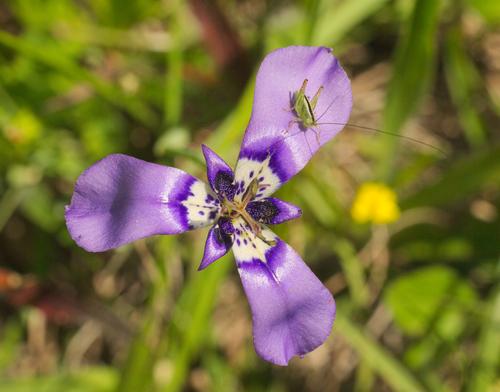
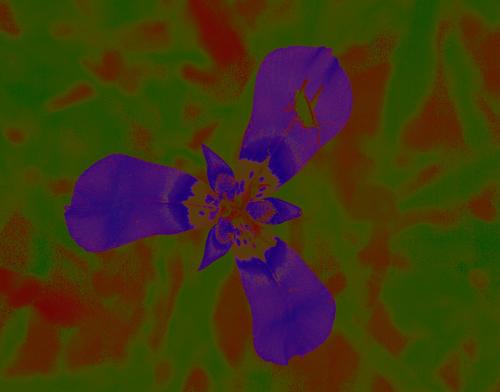
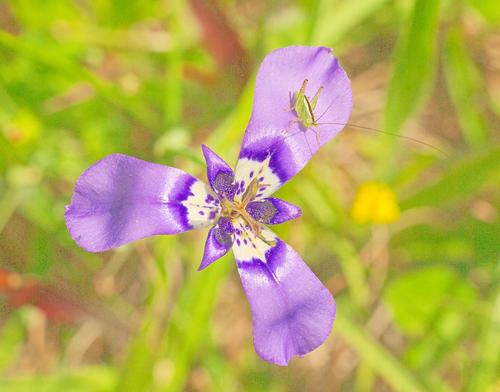
    I'm thinking that extracting the hues-only in the GIMP and then partially merging the result (adjust opacity) with the original could be interesting.

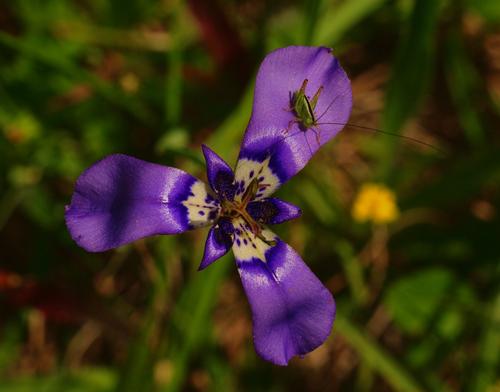
    Original:

    trinidad2.jpg

    Hues:

    trinidad2-HSV.jpg

    trinidad2-HSV-opacity.jpg

    Observe the shadow colors ...

    Flower is herbertia lahue

    trinidad2-HSV-opacity.jpg

    JPG, 878.0 KB, uploaded by xpatUSA on Aug. 21, 2023.

    trinidad2-HSV.jpg

    JPG, 845.5 KB, uploaded by xpatUSA on Aug. 21, 2023.

    trinidad2.jpg

    JPG, 598.4 KB, uploaded by xpatUSA on Aug. 21, 2023.

  • link
    TomAxford
    Members 394 posts
    Aug. 22, 2023, 9:03 a.m. Aug. 22, 2023, 9:03 a.m.
    link
    @xpatUSA has written:

    trinidad2-HSV-opacity.jpgCamera: DMC-G1/Panasonic ISO100 45mm 1/400s 𝑓/11.0

    Observe the shadow colors ...

    Flower is herbertia lahue

    Yes, there are many interesting possibilities.

    Here's another one I quite like:

    trinidad2-1.jpg
    (done by creating a duplicate layer of mode "HSV Value", then raising the black point in that layer and using Unsharp Mask a couple of times to bring out the detail)

    trinidad2-1.jpg

    JPG, 678.0 KB, uploaded by TomAxford on Aug. 22, 2023.

    xpatUSA likes this.

    favorite 1

arrow_upward

There are no more posts in this thread.

  • DPRevived.com is owned and operated by The Photographer's Foundation Limited, registered in England, company number 14795583. Email: management@DPRevived.com
powered by misago