• Members 1589 posts
    Sept. 23, 2026, 1:04 p.m.

    Alien Mapping can be fun for those who like faux colors. I have it in the GIMP on my Adobe-free computer. I haven't found a plug-in for other apps.

    docs.gimp.org/2.10/en/gimp-filter-alien-map.html

    Here's an example session to give an idea of the possibilities ...

    An original stolen from a DPRevived 'edit my image' post:
    orig.jpg

    Tarted up for an enhanced mapping:
    orig+lvls+USM.jpg

    Here's the default mapping in RGB mode:
    alien map RGB default.jpg

    Here's the default mapping in HSL mode:
    alien map HSL default.jpg

    As you can see, it's pretty drastic when opened but can be toned down by the many available options.
    alien map HSL default.jpg

    JPG, 529.6 KB, uploaded by xpatUSA on Sept. 23, 2026.

    alien map RGB default.jpg

    JPG, 528.0 KB, uploaded by xpatUSA on Sept. 23, 2026.

    orig+lvls+USM.jpg

    JPG, 427.5 KB, uploaded by xpatUSA on Sept. 23, 2026.

    orig.jpg

    JPG, 244.1 KB, uploaded by xpatUSA on Sept. 23, 2026.

  • Members 1589 posts
    Sept. 23, 2026, 1:36 p.m.

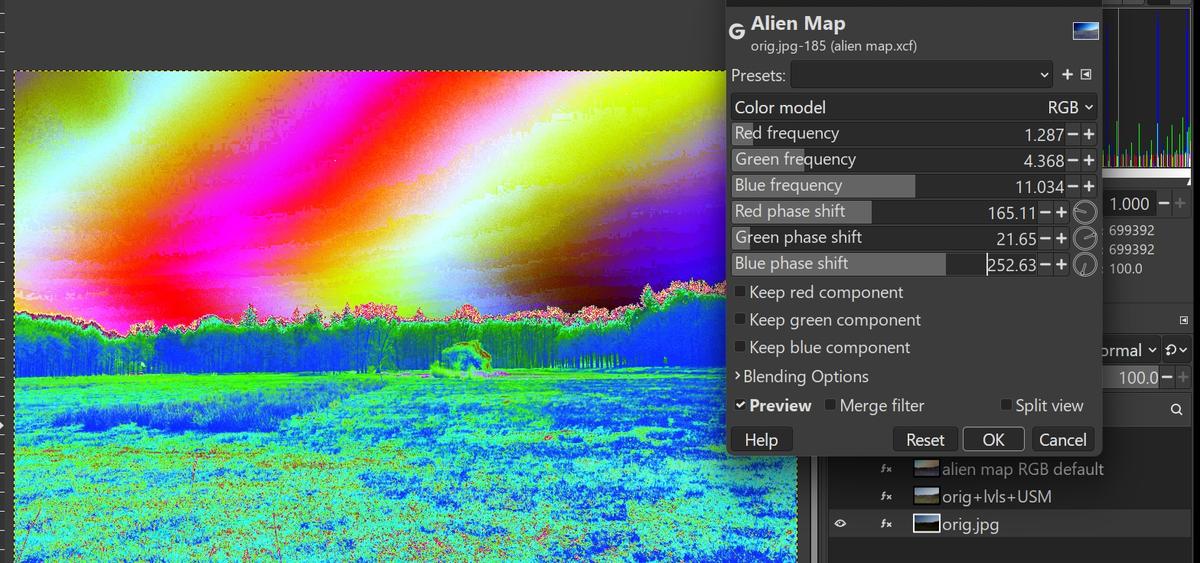
    Here's a major play with the sliders in RGB mode:

    play.jpg

    You can see that the frequency slider increases the rate of color changes across the image and that the phase slider shifts the color change from side-to-side.

    play.jpg

    JPG, 968.5 KB, uploaded by xpatUSA on Sept. 23, 2026.

  • Members 84 posts
    Sept. 23, 2026, 2:52 p.m.

    And I must say, I’m actually a bit honoured that you borrowed one of my images to illustrate “Alien Mapping.” I appreciate the gesture.

  • Members 1589 posts
    Sept. 23, 2026, 3:07 p.m.

    Thanks!