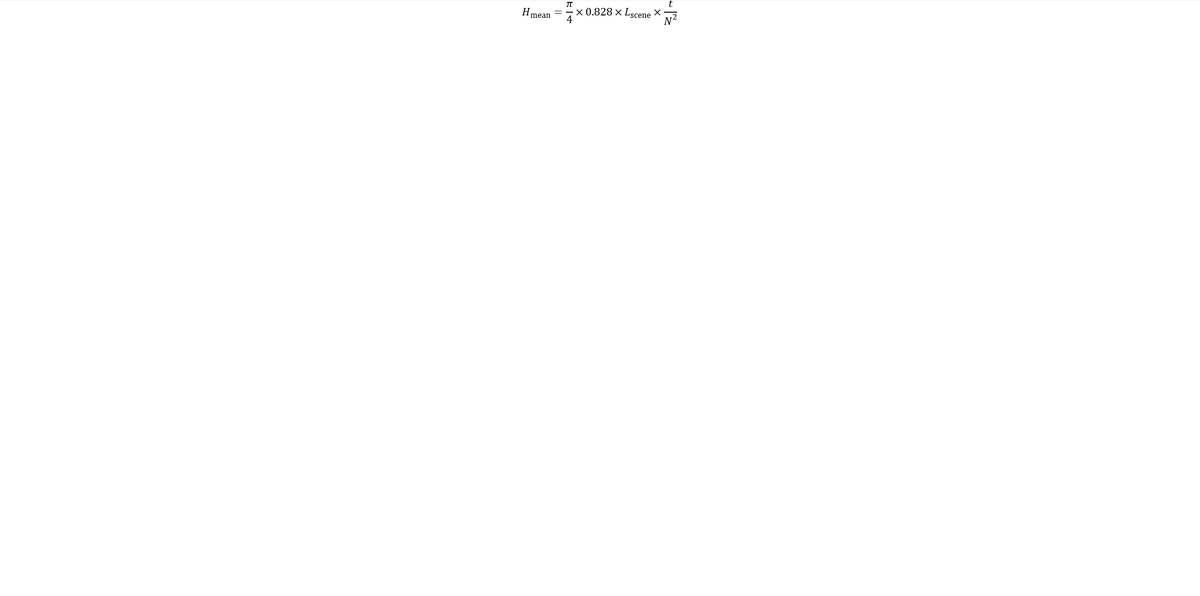
Yes a formula appears mid top of screen. It is quite readable but perhaps a touch small.

Yes, I can also see the formula. It appears clearly, top center on an otherwise white screen.
The size is however small. If the font could make it appear about 3 times bigger it would be impressive.
@xpatUSA has written: @xpatUSA has written:Currently, I'm using LibreOffice to generate a .mml file. It can be opened in LibreOffice or as a link:
kronometric.org/MML%20libreoffice%20II.mml
Please click on the above and see what comes up ...
... does a formula show on your screen?
Tried to bump this post but I lost most of it to the mists of time.
Would appreciate any answers to the question even if not interested in this now-dying topic ,,, TIA
Yes, I can also see the formula. It appears clearly, top center on an otherwise white screen.
The size is however small. If the font could make it appear about 3 times bigger it would be impressive.
Thank you very much!
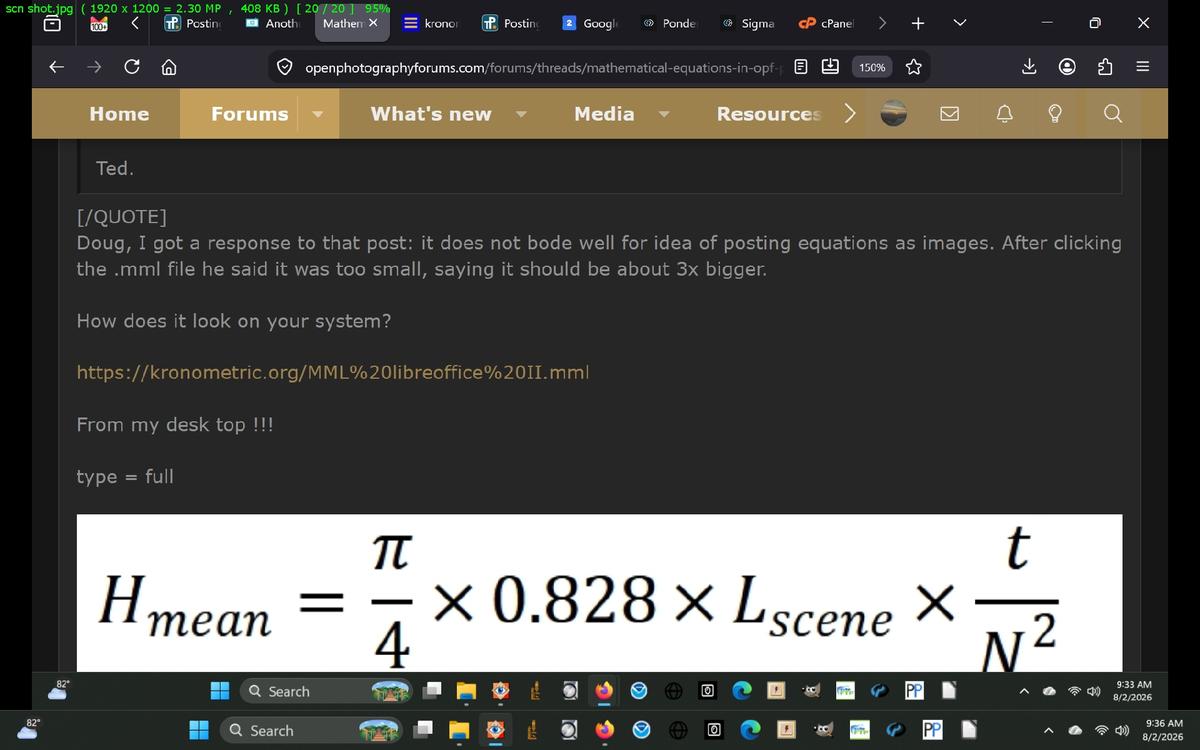
Here's a crop from how it looks on my 1920x1200 px screen in FireFox with no editing, just a crop.
It's 688x148 px on the desktop, so looks like different systems/browser setting can make quite a difference i.e. on your system: "too small", on mine: "too big". How does the above crop look on your system, please?
It's looking like the idea of posting equations as images might fail ...
@Fireplace33 has written: @xpatUSA has written: @xpatUSA has written:Currently, I'm using LibreOffice to generate a .mml file. It can be opened in LibreOffice or as a link:
kronometric.org/MML%20libreoffice%20II.mml
Please click on the above and see what comes up ...
... does a formula show on your screen?
Tried to bump this post but I lost most of it to the mists of time.
Would appreciate any answers to the question even if not interested in this now-dying topic ,,, TIA
Yes, I can also see the formula. It appears clearly, top center on an otherwise white screen.
The size is however small. If the font could make it appear about 3 times bigger it would be impressive.Thank you very much!
Here's a crop from how it looks on my 1920x1200 px screen in FireFox with no editing, just a crop.
It's 688x148 px on the desktop, so looks like different systems/browser setting can make quite a difference i.e. on your system: "too small", on mine: "too big". How does the above crop look on your system, please?
It's looking like the idea of posting equations as images might fail ...
My display is 2560 x 1440 pixels.
I made a similar crop of the image that I get when I click on the link, and it is about 740x150 pixels
And if I change the zoom setting in Firefox to 200% -300% it looks good and big for me.
At 100% zoom it is readable, but looks small, when if I zoom in it's fine.,
@xpatUSA has written: @Fireplace33 has written: @xpatUSA has written: @xpatUSA has written:Currently, I'm using LibreOffice to generate a .mml file. It can be opened in LibreOffice or as a link:
kronometric.org/MML%20libreoffice%20II.mml
Please click on the above and see what comes up ...
... does a formula show on your screen?
Tried to bump this post but I lost most of it to the mists of time.
Would appreciate any answers to the question even if not interested in this now-dying topic ,,, TIA
Yes, I can also see the formula. It appears clearly, top center on an otherwise white screen.
The size is however small. If the font could make it appear about 3 times bigger it would be impressive.Thank you very much!
Here's a crop from how it looks on my 1920x1200 px screen in FireFox with no editing, just a crop.
It's 688x148 px on the desktop, so looks like different systems/browser setting can make quite a difference i.e. on your system: "too small", on mine: "too big". How does the above crop look on your system, please?
It's looking like the idea of posting equations as images might fail ...
My display is 2560 x 1440 pixels.
I made a similar crop of the image that I get when I click on the link, and it is about 740x150 pixels
And if I change the zoom setting in Firefox to 200% -300% it looks good and big for me.At 100% zoom it is readable, but looks small, when if I zoom in it's fine.,
Thanks again it does indeed look like the idea is a failure ... over on openphotography forums, it comes out quite big on my system, voila:
openphotographyforums.com/forums/threads/mathematical-equations-in-opf-posts.26844/post-218851
@xpatUSA has written: @Fireplace33 has written: @xpatUSA has written: @xpatUSA has written:Currently, I'm using LibreOffice to generate a .mml file. It can be opened in LibreOffice or as a link:
kronometric.org/MML%20libreoffice%20II.mml
Please click on the above and see what comes up ...
... does a formula show on your screen?
Tried to bump this post but I lost most of it to the mists of time.
Would appreciate any answers to the question even if not interested in this now-dying topic ,,, TIA
Yes, I can also see the formula. It appears clearly, top center on an otherwise white screen.
The size is however small. If the font could make it appear about 3 times bigger it would be impressive.Thank you very much!
Here's a crop from how it looks on my 1920x1200 px screen in FireFox with no editing, just a crop.
It's 688x148 px on the desktop, so looks like different systems/browser setting can make quite a difference i.e. on your system: "too small", on mine: "too big". How does the above crop look on your system, please?
It's looking like the idea of posting equations as images might fail ...
My display is 2560 x 1440 pixels.
I made a similar crop of the image that I get when I click on the link, and it is about 740x150 pixels
And if I change the zoom setting in Firefox to 200% -300% it looks good and big for me.At 100% zoom it is readable, but looks small, when if I zoom in it's fine.,
Here's a full-screen crop of how it looks on another site on my system. Pretty big. eh?:
On my system it looks like attached image :)
That is odd. I see it the same as Arvo on the kronometric site, but it is displayed so much bigger on the openphotography site..
I wouldn't call it a failure though. I am sure there is a reason and once understood should be able to get consistent results...
And although smallish on the krono site, I can still read it clearly so all is not lost...
My problem is that the MathML method does not give the same result for every site or for every User's system or for every User's Browser and the settings thereof. Sometimes the stupid equation is too big and sometimes too small. I am personally not prepared to try and fix all that on every site that I go to, nor am I expecting others to do the same with their systems although of course it can be done.
Therefore, I withdraw the suggestion, and will probably just use in-line Unicode in future or maybe not even that, ho ho ...
... EV=log2(N^2/t) ...
Google: mathml output size
"MathML output size is controlled using the mathsize attribute, CSS styling properties, or script size multipliers. It accepts keyword values or exact length units"
Keywords: Set size via small, normal, or big. Lengths: Use explicit values like pixels (px), points (pt), or font-relative units (em, ex). Inheritance: Scales automatically based on parent container or surrounding text context unless overridden.
I asked for browser control. It gave me some CSS methods and the following MathML attribute methods:
Use Relative Units: Prefer em or rem units over px so equations scale correctly when users zoom.
Global Consistency: Define a single CSS rule for the math selector to keep all equations uniform across your website.
It appears that the keyword mathsize is deprecated...
So:
Inline CSS font-size: <math style="font-size: 1.5em;"><mrow>...</mrow></math>
I haven't tested any of the above...
My problem is that the MathML method does not give the same result for every site or for every User's system or for every User's Browser and the settings thereof.
From my brief reading for my previous post, I would guess that the issue is caused by CSS styling on the given websites and not browser related.
I believe one should be able to override CSS styling with explicit size commands. Painful I know...
@xpatUSA has written:My problem is that the MathML method does not give the same result for every site or for every User's system or for every User's Browser and the settings thereof.
From my brief reading for my previous post, I would guess that the issue is caused by CSS styling on the given websites and not browser related.
I believe one should be able to override CSS styling with explicit size commands. Painful I know...
Painful indeed, Bryan. Thank you for providing knowledgeable speculation as to possible causes of variance of image sizes between different sites or systems. CSS is a bit over my head these days ...
Just a test ...please ignore ... Source size 854x251px ...
Another test from another site ... please ignore ...
What will follow is, first, a phrase just as regular body text in this post, followed with a "picture" of the same text (as is it were an equation) with its display size in the post set to make it, as I see it here, essentially match in size the text just above it.
The quick brown fox
It would be good to hear if those two phrases had essentially the same size as seen at various other stations.
openphotographyforums.com/forums/threads/mathematical-equations-in-opf-posts.26844/post-218894
Thanks again it does indeed look like the idea is a failure ... over on openphotography forums, it comes out quite big on my system, voila:
openphotographyforums.com/forums/threads/mathematical-equations-in-opf-posts.26844/post-218851
Today found out that, over there, the CSS for attachment images class=bbImage is height=auto; max width=100%, so often bigger than original.
Today found out that, over there, the CSS for attachment images is height=auto; max width=100%, so often bigger than original.
That makes sense. Adding them as images is always going to have some issues and getting consistency perhaps impossible.
@xpatUSA has written:Today found out that, over there, the CSS for attachment images is height=auto; max width=100%, so often bigger than original.
That makes sense. Adding them as images is always going to have some issues and getting consistency perhaps impossible.
Agreed, still going strong over there... openphotographyforums.com/forums/threads/equations-in-my-opf-posts.26847/#post-218922
Several relevant threads, see here: openphotographyforums.com/forums/whats-new/
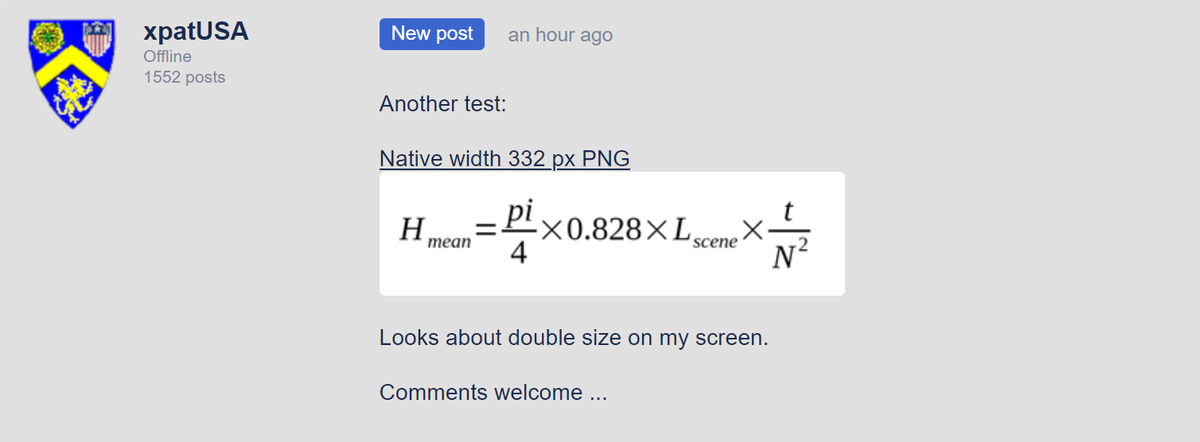
Another test:
Native width 332 px PNG

Looks about double size on my screen.
Comments welcome ...
This is what it looks like on my laptop
thank you